Here’s the system that gets the first design approved by the client
3 min
Every project we’ve run through this system has had its first concept approved, and we haven’t somehow become exceptionally good at guessing (yet).
Actually, we stopped guessing and noticed that most design revisions weren’t really about design.
A traditional design brief rarely answers the questions that studios might have, so we built a process that brings as much clarity as possible before we even start designing.
Here’s how it works:
1. Before the first call, we make the brief react to the client
The process starts with a very short brief. It takes roughly two minutes and covers the basics: what they like, what they don’t like, references they already have, and the general direction they imagine.
After that, those answers are automatically passed through an LLM, which generates roughly ten additional questions specifically for that client. So instead of giving every company the same discovery form, the second part of the brief changes depending on what they told us.
If somebody says they want the site to feel “minimal but expressive,” the follow-up questions can unpack what expressive actually means to them.
If they send three very different references, the questions can focus on what exactly they liked in each one.
If their answers contradict each other, we can surface that before the call instead of discovering it halfway through the project.
The clients know these questions are AI-generated, and most actually like it, so our first meeting starts much further ahead.
2. Before we design anything, we calibrate what the client actually means
This is where most of the system does its work. We verify three things before we build the first concept: complexity, storyline, and style.
First, we agree on the level of complexity. We pull up competitor sites or other studios’ work with a similar storyline and confirm that this is the direction they actually want before we build toward it.
Then we solve the storyline before solving the design. At this point they can already picture what the site will feel like, before we design a single pixel.
Then we calibrate the hardest thing: taste. It’s tough to get right even with a brand book in hand, because a brand book doesn’t cover every design decision.
We built an internal tool for this: we load about 150 references specific to the client's industry, split across three categories: web, UI, and visuals. On a call, the client likes or dislikes each one: the whole exercise takes only 15-20 minutes.
With multiple stakeholders, it works even better, because they do it in parallel and we find where their choices overlap. That overlap tells us exactly what to explore and what to skip.
3. Then we design
By the time we sit down to build the first concept, we already know the answers to almost every question that would normally come back as a revision.
That's the whole reason the first concept gets approved instead of revised.
Follow us on 𝕏 for more on how we run projects. If you'd rather get one perfect concept than a dozen mismatched ones, start a project with us.
FAQ
How do you get the first website design approved by a client?
Our process starts with agreeing on complexity, storyline, and visual style before designing the first concept. We use a tailored brief and review references together so we understand what the client expects before presenting our work.
What should a website design brief include?
Start with the project’s goals, audience, requirements, and visual references. Ask what the client likes and dislikes about each reference, then use follow-up questions to clarify vague or conflicting answers. Relative descriptions like “minimal” or “expressive” need concrete examples.
How do you align multiple stakeholders in a design direction?
We ask stakeholders to review the same visual references and compare their preferences. Shared choices give us a direction to explore, while disagreements highlight decisions to resolve before we start designing.
8 things we check before launching any website (one took Lighthouse from 32 to 88)
7 min
The most expensive lesson we've learned building immersive websites: they can look completely finished and still be nowhere near ready to launch.
The design can be approved, the animations can feel perfect, and so on, but once it gets posted on Instagram, the hero breaks inside the in-app browser. Then, a week after launch, half the important pages still aren't indexed.
So every website we ship goes through the same eight checks before it goes live, and some of them are not about how it looks. Most of them take less time than fixing the consequences later:
Structure headings logically and use semantic HTML.
Write useful alt text for every meaningful image.
Verify the site in Search Console and request indexing for key pages.
Give every page a unique, clickable title.
Add an llms.txt file for AI tools.
Move heavy assets to Cloudflare before traffic arrives.
Test the site inside Instagram, X and Telegram browsers.
Run Lighthouse, keep blur to a minimum.
Here's how we do each one.
1. Check heading structure and use semantic HTML
Before launch, we check that the headings describe the content and follow a logical hierarchy: a main h1, h2s for sections, and h3s for subsections. This makes the page easier to navigate and understand. Google specifically recommends putting important words in prominent locations such as the title and main heading, and using semantic HTML where possible.
2. Write useful alt texts for every image
First of all, it's an accessibility requirement, but apart from that, it helps SEO too. It does not mean describing every decorative gradient, icon and background shape on the site. The question we use is: “If this image disappeared, what information would the user lose?” Good alt text improves accessibility and also gives Google more context about the image. Google explicitly uses alt text alongside page content and image understanding systems to determine what an image is about. The bad version is "dashboard image", but the useful one is closer to "Analytics dashboard showing monthly revenue growth from January to June".
3. Verify the website in Google Search Console and request indexing for key pages manually
For a small website, that means inspecting the core URLs directly. For a larger site, it also means submitting and checking the sitemap.
Search Console’s URL Inspection tool lets you see what Google knows about a URL, test the live page and request indexing. For many URLs, Google recommends using a sitemap rather than manually submitting everything one by one. Important note: requesting indexing does not guarantee that Google will index the page immediately, but it’s much better than discovering two weeks later that Google couldn’t properly crawl an important page.
4. Check every page title manually
Duplicate titles across pages are one of the most common mistakes we see, and they cost rankings. Google recommends giving every page a descriptive <title> and avoiding repeated or boilerplate titles across a site. Each important URL should answer three questions immediately: What is this page about? Why is it different from the other pages? Would I click this title if I saw it in Google? If the answer to any of those is unclear, rewrite it.
5. Add llms.txt
AI agents read a page differently than search crawlers do, and llms.txt tells them what the page actually is. This way, AI systems get a cleaner, machine-readable map of the most useful content on the site instead of expecting an agent to reconstruct everything. Remember, this is just an additional machine-readable layer. Your actual website still needs clean HTML, useful page copy, logical URLs and accessible content.
6. Move heavy assets to Cloudflare before launch
High-end websites become heavy very quickly: video loops, large PNGs, renders, background images, galleries, and so on. All of them look great until thousands of people start requesting them from different parts of the world. We use Cloudflare R2 + Cloudflare Images + Cloudflare CDN for fast image delivery worldwide on asset-heavy projects. We learned this once through a bandwidth bill we would rather not pay twice,
7. Test the website inside Instagram, X, and other in-app browsers before anyone else does
This is one of the easiest checks to skip because everything already looks perfect in Safari and Chrome, and then, the marketing starts.
The founder posts the website on Instagram and X, the Telegram community opens it from a pinned post, but users are not visiting your website through normal Chrome, the website opens through built-in browsers controlled by those apps. In our experience, they can be unreliable. Those in-app browsers render pages differently from standalone web browsers, especially anything using view_height can break without warning, and nobody catches it until a client sends the link to their whole audience. Do it like this: create a real post or burner profile → add the link → open it from another account → only then navigate the website like a normal user. The Framer preview or resizing desktop Chrome won’t help, do only via the actual apps. We test Instagram, X and Telegram at minimum when they matter to the client’s acquisition channels, because websites should work where your traffic comes from.
8. Run the website through Google Lighthouse and investigate loading performance
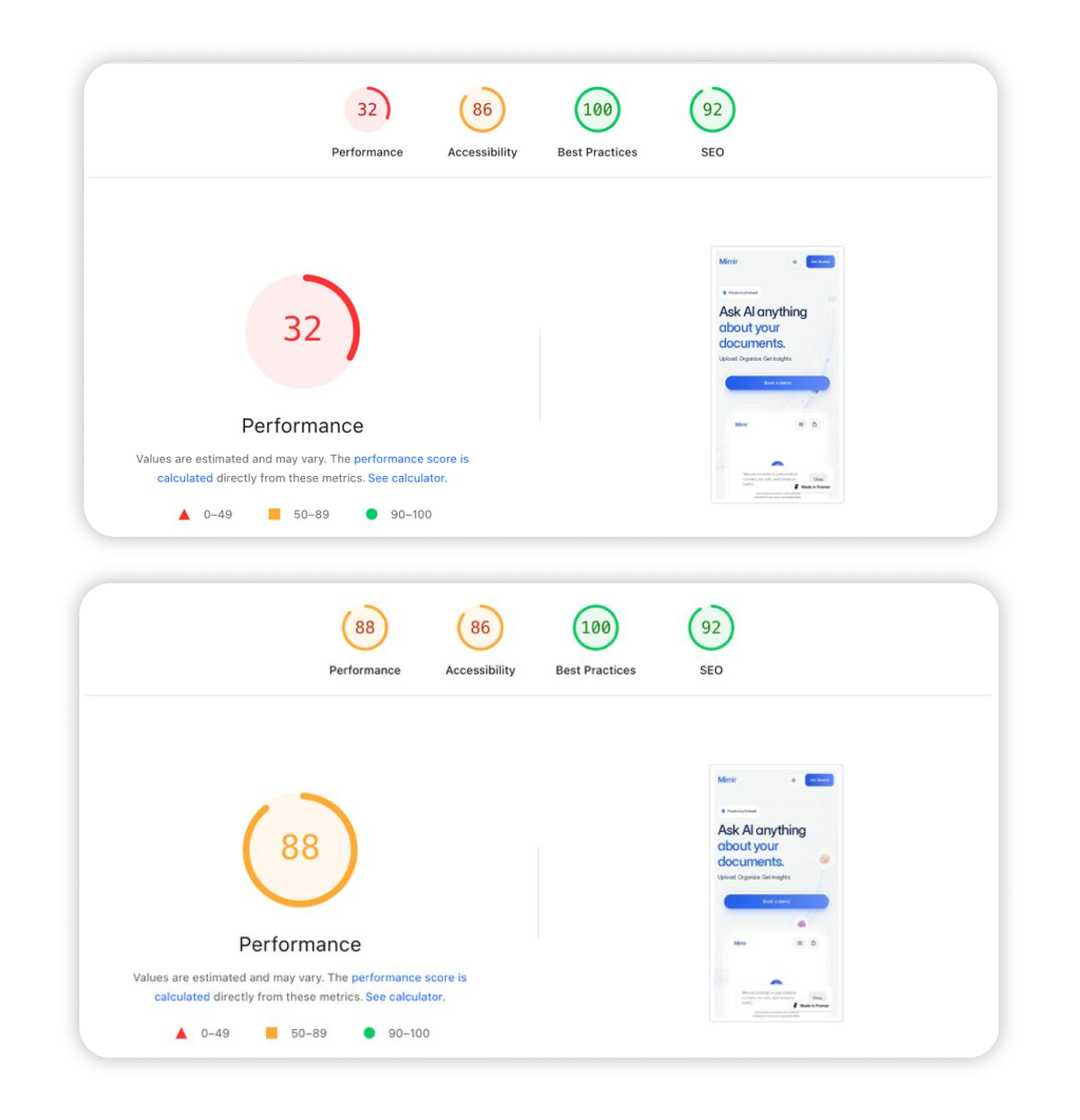
We use Lighthouse as a diagnostic tool to see if something is blocking the initial render, whether fonts are delaying text, animations doing too much work, and so on. One thing we watch particularly closely on design-heavy sites is blur. If you’re using it, keep CSS blur effects to a minimum: it costs more to render than most people think. We use .png and .webp even when the file looks bigger, because it's just easier on the visitor's device to render. Too much CSS and too many renders is what slows a site down too. That leads to a slightly counterintuitive lesson: the smallest asset is not always the fastest solution. On one project, that process took the Lighthouse performance score from 32 to 88 (a 2.75x improvement), and visually, almost nothing changed:
8. Run the website through Google Lighthouse and investigate loading performance
We use Lighthouse as a diagnostic tool to see if something is blocking the initial render, whether fonts are delaying text, animations doing too much work, and so on.
One thing we watch particularly closely on design-heavy sites is blur.If you’re using it, keep CSS blur effects to a minimum: it costs more to render than most people think.
We use .png and .webp even when the file looks bigger, because it's just easier on the visitor's device to render. Too much CSS and too many renders is what slows a site down too.
That leads to a slightly counterintuitive lesson: the smallest asset is not always the fastest solution.
On one project, that process took the Lighthouse performance score from 32 to 88 (a 2.75x improvement), and visually, almost nothing changed:
A website is not finished when the design is finished. It’s finished when people can find it, machines can understand it, browsers can render it, devices can run it, and real users can open it from the places where they actually discover it.
These checks are what stop the beautiful part from breaking. Save this list: someone is skipping one of these this week.
Follow us on 𝕏 for more checklists like this one. If you want your next launch handled end-to-end, start a project with us.
Q&A
What should you check before launching a Framer website?
Check heading structure, image alt text, page titles, Google Search Console setup, asset delivery, mobile layouts and loading performance. Test the published website in the in-app browsers your audience uses, too.
How do you submit a Framer website to Google?
Verify your domain in Google Search Console, submit your sitemap and use the URL Inspection tool to check important pages and request indexing. A request does not guarantee that Google will index a page or how quickly it will happen.
How can you improve a Framer website’s performance?
Use Lighthouse to identify bottlenecks, then optimize heavy images and videos, reduce expensive visual effects and limit unnecessary rendering work. Test the results on mobile devices as well as desktop.
Does a website need llms.txt?
Yes, it’s a proposed format that gives supporting AI tools an overview of your website and links to useful content. However, it does not replace standard SEO work or guarantee visibility in AI answers.
How we save 100 hours a week by building brand generators
5 min
It started with a paywall. Our new website needed a specific look for its graphics, the kind of effect some tools sell as a plugin or a subscription-based service. We looked at the price, then asked the question everyone asks: “Can we just build this ourselves?”
So we built a fully working brand generator: an image or video goes in, and the final look comes out.
This is the actual output. It took us just one day from idea to a working tool, and now it's a part of our pipeline.
Instead of processing this live on every page load, we built a tool that draws a web of tracked connection points over any video input and bakes the result into a lightweight file a Framer component can just play.
A gradient of dots handles the transition after video blocks, generated on the fly by a component with a long list of tunable settings underneath it.
One that didn't make the final site, but is worth showing anyway: a pattern generator that takes a character set, checks which glyphs' edges are actually compatible with each other, and fills the next cell with a random character that fits. It's live, so you can play with it.
The tool tracks points across the footage, draws connections between them, and exports the finished animation as a lightweight file for the website.
Why this made sense to build instead of buy
The look is already trending. Bitmap, dithered, grid-of-dots imagery is everywhere right now. AI-native brands reach for it because it reads as more human than a glossy render.
It's a good metaphor for AI itself. An image built from a swarm of discrete points mirrors what a model does to information: takes something continuous and breaks it into something countable.
Vibecoding puts this in designers' hands. Not just noise or dithering generators, the ability to write a client's actual brand rules, palette, grid, motion, straight into code a tool runs, instead of notes on a page someone has to interpret correctly.
It's often the only practical way to create patterns. Hand-assembling one like this, dot by dot, line by line, is very irrational. That production necessity is what makes every generated output unique, and uniqueness like that often becomes a metaphor for the brand itself: no two pieces of it ever look quite the same.
The second time we did this: Mostik.ai@mostik_ai came to us at the earliest stage a startup can be at: a real product, but no designer on the team.
We configured Claude to generate the brand's patterns, then handed over a design system built to run inside Claude Code itself. Claude took over the technical side, keeping every generated pattern on-grid and on-spec. The creative direction, the actual pattern design, still came from us.
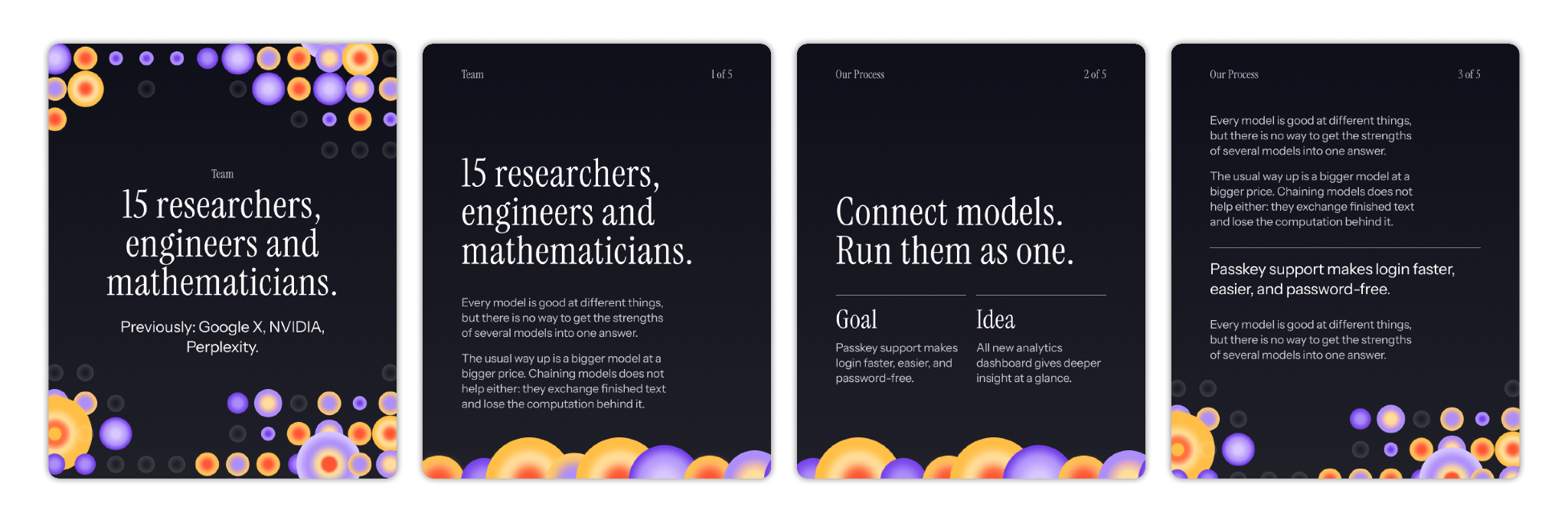
Social media visuals the team can create with the system.
The pattern itself is vector, which is the point: one system that scales cleanly from a social post to a printed box, without redrawing anything for each format.
For a team like Mostik's, the value is the hire they didn't have to make. A generator like this replaces an in-house designer at the exact stage a startup can't justify one yet.
Static guide vs. brand generator
This isn't unique to branding agencies. The 2026 State of AI Design report found designers building their own tools across the industry: Stripe's team shipped ProtoDash and Dante for prototyping and content generation, AirOps built a skill library inside Claude specifically for on-brand asset creation, close to exactly what we did for Mostik, and Cursor built its design system directly into the product.
The same report found that 74% of designers at enterprise companies (2,000+ employees) use internally built AI tools, compared with 26% at small companies (up to 50 employees).
Three cases show what this looks like in our own work. Here's what actually changes when you swap a static guide for one of these:
Static guide
Brand generator
Who can use it
Anyone who can read design intent off a page
Anyone who can upload a file or type a prompt
Update cost
Re-export, re-send, hope people redownload
Ship a code update, everyone's on it
Best fit
One-off launches
Ongoing content, no in-house designer
How do you choose between a static guide and a brand generator?
Ask yourself three questions:
Will the client produce content regularly? A generator earns its build cost on a brand doing weekly social posts, while a one-time launch doesn't need software.
Is the brand system rule-based enough to encode? Grids, palettes, dithering effects, motion curves translate into code cleanly. A brand built on subjective art direction doesn't.
Does someone own it after you leave? Even a non-technical owner on the client side needs to know what inputs to feed it, or it goes unused exactly like the guide it replaced.
This is not a standard on every project yet, but every time a client asks for something a static file can't really deliver, or a tool wants money for something we can build ourselves in a day, this is the direction we reach for now at ubernatural.
Follow us on 𝕏 for more tools like this one. If your brand needs something similar, start a project with us.
Short FAQ for curious minds
What is procedural branding? A brand system where illustrations, patterns, layouts, and other visuals are generated by code following the brand’s rules, instead of pre-made assets a designer produces by hand each time.
What's the difference between a style guide and a brand generator? A style guide documents rules for a person to apply. A generator encodes those rules into a tool that applies them automatically from an input, a photo or a headline.
Do you need to code to use one of these tools? No, you just upload a file or type text into a simple interface, and get the final result.
How long does it take to build a tool like this? Depends what it needs to do. Our brand generator took us a day. A more complex system that has to plug into a client's own workflow, like the one we built for Mostik, takes longer.
Is a custom generator worth it for a startup? Yes, especially if you don’t have an in-house designer but still need consistent design for socials, decks, and so on.