How we save 100 hours a week by building brand generators
5 min
It started with a paywall. Our new website needed a specific look for its graphics, the kind of effect some tools sell as a plugin or a subscription-based service. We looked at the price, then asked the question everyone asks: “Can we just build this ourselves?”
So we built a fully working brand generator: an image or video goes in, and the final look comes out.

This is the actual output. It took us just one day from idea to a working tool, and now it's a part of our pipeline.
Instead of processing this live on every page load, we built a tool that draws a web of tracked connection points over any video input and bakes the result into a lightweight file a Framer component can just play.
A gradient of dots handles the transition after video blocks, generated on the fly by a component with a long list of tunable settings underneath it.
One that didn't make the final site, but is worth showing anyway: a pattern generator that takes a character set, checks which glyphs' edges are actually compatible with each other, and fills the next cell with a random character that fits. It's live, so you can play with it.

The tool tracks points across the footage, draws connections between them, and exports the finished animation as a lightweight file for the website.
Why this made sense to build instead of buy
- The look is already trending. Bitmap, dithered, grid-of-dots imagery is everywhere right now. AI-native brands reach for it because it reads as more human than a glossy render.
- It's a good metaphor for AI itself. An image built from a swarm of discrete points mirrors what a model does to information: takes something continuous and breaks it into something countable.
- Vibecoding puts this in designers' hands. Not just noise or dithering generators, the ability to write a client's actual brand rules, palette, grid, motion, straight into code a tool runs, instead of notes on a page someone has to interpret correctly.
- It's often the only practical way to create patterns. Hand-assembling one like this, dot by dot, line by line, is very irrational. That production necessity is what makes every generated output unique, and uniqueness like that often becomes a metaphor for the brand itself: no two pieces of it ever look quite the same.
The second time we did this: Mostik.ai @mostik_ai came to us at the earliest stage a startup can be at: a real product, but no designer on the team.

Congrats to the team! https://x.com/aimalysheva/status/2095232794792255848
We configured Claude to generate the brand's patterns, then handed over a design system built to run inside Claude Code itself. Claude took over the technical side, keeping every generated pattern on-grid and on-spec. The creative direction, the actual pattern design, still came from us.
Social media visuals the team can create with the system.
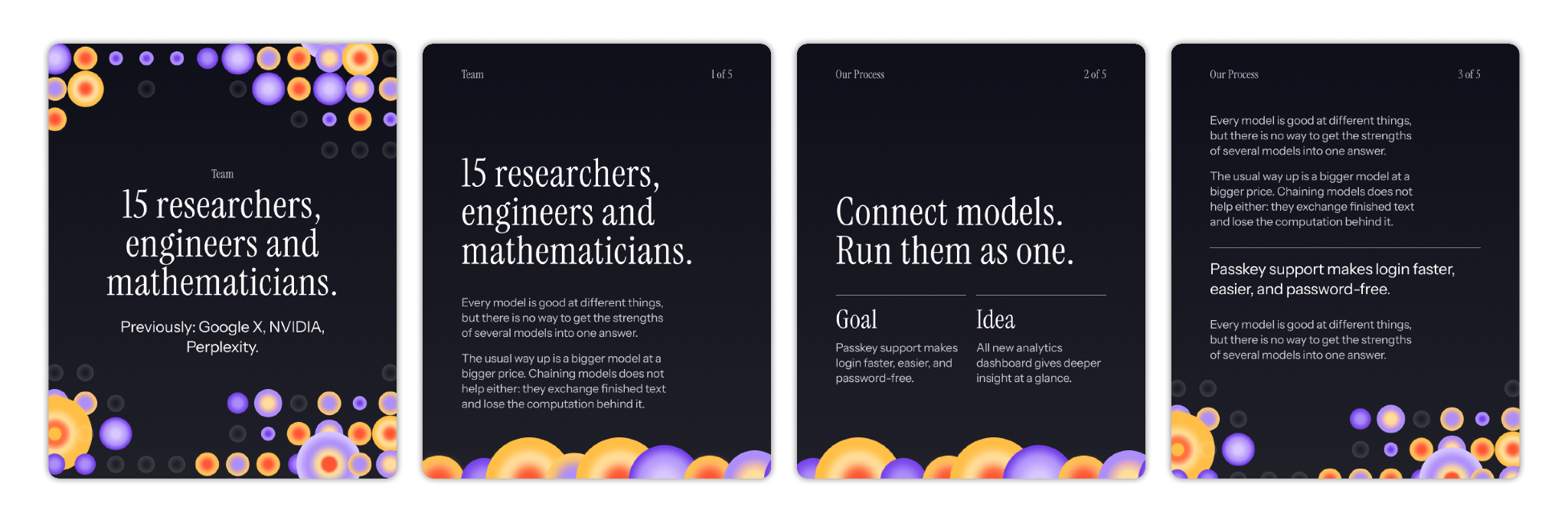
The pattern itself is vector, which is the point: one system that scales cleanly from a social post to a printed box, without redrawing anything for each format.
For a team like Mostik's, the value is the hire they didn't have to make. A generator like this replaces an in-house designer at the exact stage a startup can't justify one yet.
Static guide vs. brand generator
This isn't unique to branding agencies. The 2026 State of AI Design report found designers building their own tools across the industry: Stripe's team shipped ProtoDash and Dante for prototyping and content generation, AirOps built a skill library inside Claude specifically for on-brand asset creation, close to exactly what we did for Mostik, and Cursor built its design system directly into the product.
The same report found that 74% of designers at enterprise companies (2,000+ employees) use internally built AI tools, compared with 26% at small companies (up to 50 employees).
Three cases show what this looks like in our own work. Here's what actually changes when you swap a static guide for one of these:
Static guide
Brand generator
Who can use it
Anyone who can read design intent off a page
Anyone who can upload a file or type a prompt
Update cost
Re-export, re-send, hope people redownload
Ship a code update, everyone's on it
Best fit
One-off launches
Ongoing content, no in-house designer
How do you choose between a static guide and a brand generator?
Ask yourself three questions:
- Will the client produce content regularly? A generator earns its build cost on a brand doing weekly social posts, while a one-time launch doesn't need software.
- Is the brand system rule-based enough to encode? Grids, palettes, dithering effects, motion curves translate into code cleanly. A brand built on subjective art direction doesn't.
- Does someone own it after you leave? Even a non-technical owner on the client side needs to know what inputs to feed it, or it goes unused exactly like the guide it replaced.
This is not a standard on every project yet, but every time a client asks for something a static file can't really deliver, or a tool wants money for something we can build ourselves in a day, this is the direction we reach for now at ubernatural.
Follow us on 𝕏 for more tools like this one. If your brand needs something similar, start a project with us.
Short FAQ for curious minds
What is procedural branding? A brand system where illustrations, patterns, layouts, and other visuals are generated by code following the brand’s rules, instead of pre-made assets a designer produces by hand each time.
What's the difference between a style guide and a brand generator? A style guide documents rules for a person to apply. A generator encodes those rules into a tool that applies them automatically from an input, a photo or a headline.
Do you need to code to use one of these tools? No, you just upload a file or type text into a simple interface, and get the final result.
How long does it take to build a tool like this? Depends what it needs to do. Our brand generator took us a day. A more complex system that has to plug into a client's own workflow, like the one we built for Mostik, takes longer.
Is a custom generator worth it for a startup? Yes, especially if you don’t have an in-house designer but still need consistent design for socials, decks, and so on.